
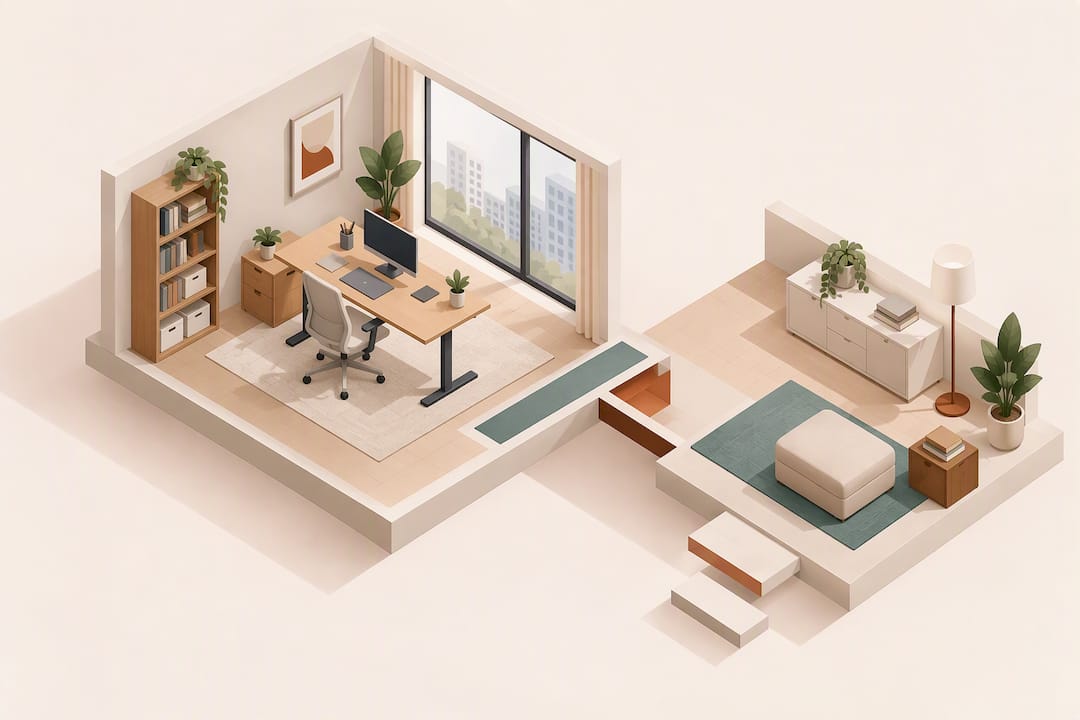
An ergonomically sound home office starts with three things: a room measured before anything is bought, a chair and desk that fit the person using them, and a monitor set at eye level with the correct distance. Guidance from the WSH Council and Singapore Standard SS 514:2016 both point to the same priorities. If you measure your room, test chair adjustability, align your monitor and check your power setup now, you are most of the way to a safe, workable office. Renting from a local supplier can close the remaining gaps quickly.
TL;DR:
- Proper room measurements, delivery access, and electrical outlet capacity are essential before purchasing or renting furniture for a Singapore home office.
- An ergonomic desk should allow forearms to rest at 90 degrees, and the chair must have adjustable seat height, lumbar support, and armrests for optimal comfort.
- Monitor eye level and distance are critical, and a laptop riser with external peripherals is necessary to prevent neck strain during long hours.
- Positioning your desk to avoid glare, using soft lighting, and installing noise absorption elements improve comfort during video calls and work hours.
- A systematic weekly check of setup, cable safety, and ergonomic adjustments helps maintain health and functionality in a compact Singapore home workspace.
Table of Contents
- Room and workflow assessment: measure and plan before you buy or rent
- Essential furniture: pick desks and chairs that fit the person and the room
- Ergonomic peripherals: monitors, laptop stands, keyboard and mouse placement
- Lighting and glare control for screens and video calls
- Power, cable management and electrical safety (Singapore-specific)
- Storage and desk organisation for compact Singapore homes
- Movement, breaks and wellbeing: how to use your setup to stay healthy
- Printable quick checklist: one-page items to tick off while furnishing and setting up
- Acoustic considerations and noise control
- Climate control and air quality in the home office
- Decor and personalisation for productivity and comfort
- Technology and connectivity essentials (internet speed, routers, backup)
- How Expats Partner can help with furniture rental and furnishing packages
- FAQ
- Authoritative Singapore guidance and reputable gear guides
Room and workflow assessment: measure and plan before you buy or rent
Furniture decisions in a Singapore flat or condo depend on numbers, not guesswork. Start by measuring the room’s length, width and doorway width, then check the circulation space you need to pull out a chair or open a cupboard door. Note which direction the windows face, because this affects both glare on your screen and how much daylight the room gets through the day. List every piece of equipment that needs a spot: laptop, monitor, printer, headset, files, keeping in mind the practical considerations for planning a workspace and access routes in Singapore outlined by Aesthetic Havens. Many Singapore developments have lift and loading-bay restrictions, so confirm delivery access and booking windows with your building management before furniture arrives.
- Measure room length, width, doorway width and clear floor space around the desk.
- Note window position and likely glare direction at different times of day.
- List all equipment that needs a surface, socket or shelf.
- Confirm lift booking, loading bay access and delivery time windows with your building.
Our corporate housing furnishing guide covers this planning stage in more depth for readers setting up furnished accommodation on a timeline.
Essential furniture: pick desks and chairs that fit the person and the room
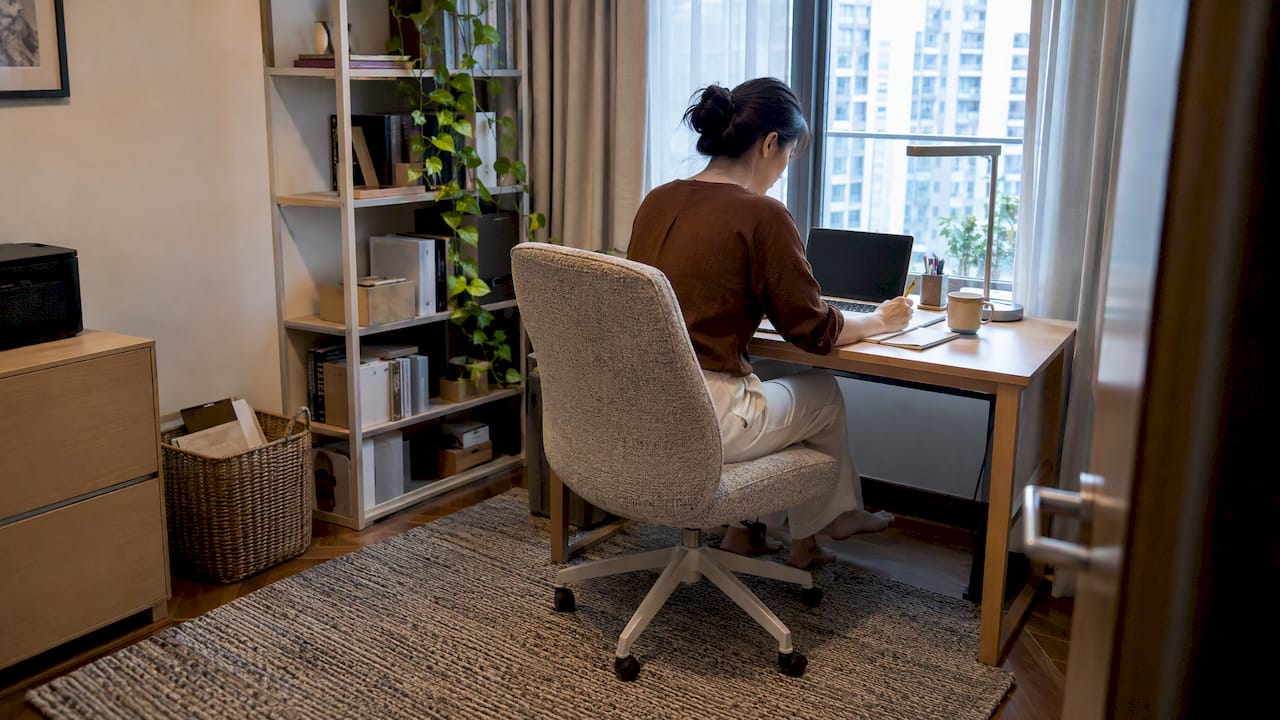
A desk that looks right in a showroom can still fail ergonomically once someone sits at it for eight hours. The WSH Council’s guidance on workplace ergonomics recommends a work surface sized to the task, with enough knee and legroom underneath, paired with a stable chair that has an adjustable backrest and armrests. Measure desk height with the user seated, forearms at roughly 90 degrees, and check that knees clear the underside without touching the frame. For the chair, confirm that seat height, lumbar support, backrest recline and armrest height can all be adjusted independently, not fixed at a single setting.
- Desk height should let forearms rest at about 90 degrees when typing.
- Confirm knee and legroom clearance before committing to a desk.
- Chair seat height, lumbar support and armrests should adjust independently.
- Test the chair with real tasks (typing, reaching, a short call) for ten to fifteen minutes, not just a quick sit.
Pro Tip: Adjust one feature at a time (seat height first, then lumbar support, then armrests) rather than all at once, so you can tell which change actually fixes your discomfort.
For a short stay or a role that may relocate within the year, renting a desk and chair rather than buying avoids the cost of disposal later. Our expatriate furnishing guide for Singapore moves walks through when a rental package makes more sense than a purchase.
Ergonomic peripherals: monitors, laptop stands, keyboard and mouse placement
The WSH Council’s guidance places the monitor directly in front of the user, at a distance and height that keep the neck in a neutral position rather than tilted up or down. As a starting point, the top of the screen should sit roughly at eye level, with the whole display an arm’s length away. Laptop users working straight off a built-in keyboard for hours are the most common ergonomic failure in home offices: a laptop riser plus an external keyboard and mouse is the minimum setup, since it lets the screen sit at eye height while the hands stay at a comfortable working height. Keep the keyboard and mouse within easy reach so you are not stretching for either one.
- Position the monitor top at roughly eye level, an arm’s length from your face.
- Add a laptop riser with an external keyboard and mouse if you work mainly on a laptop.
- Keep the mouse beside the keyboard at the same height, within comfortable reach.
- Rest wrists in a straight, neutral line rather than bent up or down while typing.
A second screen or a monitor arm is worth adding once you are spending full days at the desk, since it reduces the neck strain that comes from constantly glancing between a laptop and a separate display.
Lighting and glare control for screens and video calls
Glare is one of the easiest ergonomic problems to fix and one of the most commonly ignored. Position your desk side-on to the main window rather than facing it or with your back to it, since both of those positions throw glare either into your eyes or onto the screen. Blinds or a diffusing curtain let you keep daylight in the room without the harsh reflection on a monitor. For task lighting, choose an adjustable lamp with a non-reflective, matte finish and an LED bulb, positioned to light your work surface rather than your face.
- Sit side-on to windows rather than facing them or with your back to the light.
- Use blinds or a diffuser to soften direct sunlight on the screen.
- Choose a matte-finish, adjustable LED task lamp for close work.
- For video calls, add a soft light source in front of you and avoid strong light behind you.
Good front lighting on calls matters as much as what is on screen behind you, since backlighting from a window leaves your face in shadow on camera.
Power, cable management and electrical safety (Singapore-specific)
Before you place a single piece of furniture, check where your wall outlets sit relative to your planned desk position, and count how many devices will need power at once. Use a certified, surge-protected power strip rather than daisy-chaining extension cords, and route cables along the wall or through an under-desk tray so nothing crosses a walkway. Furniture layout and cable tidying are tasks you can handle yourself, but any fixed wiring work in Singapore must be carried out by a Licensed Electrical Worker. Treat that as a hard line: if a socket seems insufficient for your setup, call an LEW rather than attempting a fix yourself.
- Count devices and plugs needed, then match outlet capacity before buying furniture.
- Use a certified surge-protected power strip, not stacked extension leads.
- Run cables through clips, covers or an under-desk tray away from walkways.
- Escalate any fixed wiring question to a Licensed Electrical Worker rather than doing it yourself.
Storage and desk organisation for compact Singapore homes
Most Singapore home offices work with a smaller footprint than their occupants would like, so storage has to earn its space. Vertical shelving and slim mobile pedestals hold more than they appear to while leaving the floor clear, and a desk with an integrated shelf or drawer cuts down on separate furniture pieces. Organise by how often you reach for something: pens, chargers and daily files belong within arm’s reach, while archive boxes and rarely used equipment can go higher or further away. Keep paperwork labelled and contained rather than stacked loose, store small valuables and sensitive documents in a locked box, and shred confidential waste instead of binning it whole.
- Choose vertical shelving and slim mobile pedestals over bulky cabinets.
- Keep daily items within arm’s reach; store infrequent items higher or further out.
- Label folders and contain loose paperwork rather than stacking it.
- Lock away valuables and sensitive documents, and shred confidential waste.
Our home staging ideas for small condos in Singapore has more layout ideas for keeping a compact room functional without feeling cramped.
Movement, breaks and wellbeing: how to use your setup to stay healthy
A well-fitted desk and chair only help if you actually change position through the day. The WSH Council’s guidance favours posture variation over sitting still for long uninterrupted stretches, so build short breaks and small adjustments into your routine rather than treating your chair settings as fixed forever.
- Stand or walk for a few minutes every 45 to 60 minutes.
- Re-check chair height and lumbar support if you feel stiffness building.
- Do a quick cable and walkway safety glance once a week.
- Reset lighting and monitor angle if the sun’s position has shifted with the season.
Pro Tip: A simple kitchen timer or phone alarm set for every hour is often enough to break up a static sitting pattern; you do not need a sit-stand desk to benefit from standing briefly.
Printable quick checklist: one-page items to tick off while furnishing and setting up
Keep this list handy while you shop, rent or set up your office, and run through it again once you have been working at the desk for a week.
- Room measured, doorway and circulation space confirmed.
- Chair seat height, lumbar support and armrests adjust independently.
- Monitor top at eye level, an arm’s length away, free of glare.
- Power strip is certified and surge-protected, cables clear of walkways.
- Storage organised by frequency of use, valuables locked away.
| Area | Quick check |
|---|---|
| Room | Measurements and access route confirmed |
| Seating | Chair adjusts at seat, lumbar and armrests |
| Screen | Monitor at eye level, glare-free |
| Power | Surge-protected strip, tidy cables |
| Storage | Daily items within reach, valuables secured |
A short-term furniture rental is often the fastest way to tick most of this list in one visit rather than sourcing each item separately. Take a few photos of your finished setup on day one, then compare them after a week to see which adjustments actually stuck.
Acoustic considerations and noise control
Sound carries more than most people expect in a Housing & Development Board flat or condo corridor, and video calls make poor acoustics obvious fast. A room with a hard floor, bare walls and a window facing a busy road will pick up far more noise than one with soft furnishings to absorb it. Rugs, curtains and upholstered furniture all reduce echo and outside noise without any structural change, which matters in rented accommodation where you cannot alter the walls or flooring.
Position your desk away from shared walls with neighbours where possible, and away from the kitchen or living room if other household members are active during your working hours. A closed door helps more than people assume, cutting down both the sound you hear and the sound that travels out during calls. For persistent road or construction noise, a pair of over-ear headphones with active noise cancelling is a simpler fix than trying to soundproof a rented room. If calls are a regular part of your work, a dedicated headset also improves how clearly you are heard on the other end, which matters as much as how well you can hear.
Soft furnishings bought for noise control can double as decor, so a rug or curtain chosen for acoustics does not need to look purely functional.
Climate control and air quality in the home office
Singapore’s climate makes temperature and air quality a daily factor in how comfortable a home office feels, not an occasional concern. A room that runs too warm leads to fatigue and poor concentration within an hour or two, so position your desk away from direct afternoon sun where the heat builds fastest, and away from a wall that backs onto an outdoor compressor unit if you have a choice.
Air conditioning set to a steady, moderate temperature works better for sustained focus than cycling it on and off, and a small fan can help circulate air in a room where the aircon vent does not reach the desk directly. If the room feels stuffy between aircon sessions, opening a window briefly when outdoor air quality allows helps clear built-up humidity. A small indoor plant or two will not meaningfully change air quality, but it is a low-cost way to make a closed room feel less stale, and ties into the decor choices covered next.
Dust and humidity both affect equipment as well as comfort. Keep electronics away from direct aircon drip points and wipe down desks and keyboards regularly, since Singapore’s humidity speeds up dust build-up compared with drier climates.
Decor and personalisation for productivity and comfort
Once the functional layer is sorted, decor is what makes a home office feel like somewhere you want to spend the day rather than a corner you tolerate. Personal touches, a favourite print, a plant, a lamp you actually like, help mark the space as work territory, which matters when a home office sits inside a living room or bedroom with no door to close.
Colour and texture choices carry real weight in a small room. Lighter wall tones and furniture finishes make a compact space feel less closed in, while a single accent colour (in a cushion, a rug or a desk accessory) keeps the room feeling considered rather than cluttered. Keep decor off the primary work surface itself: a desk crowded with ornaments competes with the equipment you actually need within reach.
Plants, in particular, do double duty as decor and as a subtle marker between “work corner” and the rest of the room, and they pair naturally with the acoustic and air quality steps already covered. The goal is a space that looks considered without working against the ergonomic choices you have already made, not a separate design project layered on top of them.
Technology and connectivity essentials (internet speed, routers, backup)
A well-furnished desk is only as useful as the connection behind it. Position your router centrally in the home rather than in a back room, and keep it clear of thick walls or metal cabinets that weaken the signal reaching your office. If your desk sits at the far end of the flat from the router, a mesh extender or a wired connection via an Ethernet cable will give a steadier connection than relying on Wi-Fi alone, particularly for video calls.
Check your plan’s actual speed against what your work requires: video calls and file transfers need a stable upload speed, not just a fast download figure, so if calls regularly freeze or lag, that is usually the number worth checking first. Keep a mobile hotspot or a secondary SIM as a backup for the rare outage, especially if your work cannot tolerate downtime.
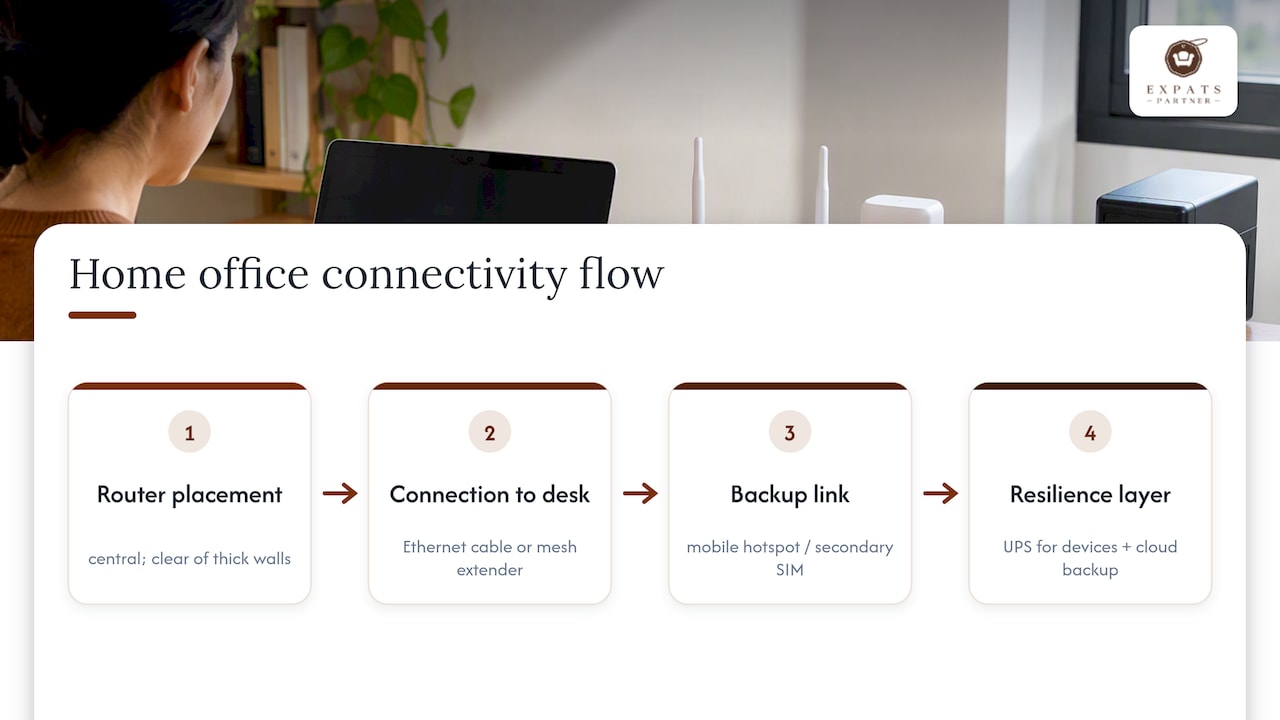
A small uninterruptible power supply (UPS) for your router and computer protects against the brief power interruptions that occasionally affect Singapore buildings, giving you enough time to save work and shut down cleanly rather than losing it outright. Back up important files to cloud storage as a matter of course, since a local drive failure is far more disruptive than a short internet outage.
How Expats Partner can help with furniture rental and furnishing packages
Working through this checklist item by item takes time that many expats and relocating households simply do not have. Short and long-term furniture rental, full-home packages and office staging built specifically for Singapore homes and workspaces are available, so you can furnish an ergonomic, functional office without sourcing a desk here, a chair there and a lamp somewhere else.
The packages draw on real, in-stock furniture rather than made-to-order pieces, which means delivery and collection can be coordinated on a timeline that suits a relocation or a short lease, with no disposal or long-term storage to arrange once you move on.
- Short and long-term furniture rental sized to your room and length of stay.
- Full-home and room-specific packages, including chairs, desks and storage pieces.
- Office and property staging for landlords, agents and developers presenting a space.
If you would rather browse ready-made options than build a list from scratch, our furniture rental packages page is the fastest way to see what fits your room and move-in date.
FAQ
What is the single most important item in a home office checklist?
An adjustable chair with independent seat height, lumbar support and armrests matters most, since it is the item in contact with your body for the longest stretch of the day. A desk and monitor set correctly around that chair follow close behind.
How high should my monitor sit for good posture?
The top of the monitor screen should sit at roughly eye level, with the whole display about an arm’s length away, following the workstation guidance set out by the WSH Council. This keeps your neck in a neutral position rather than tilted up or down for hours.
Can I rewire my own power points for a home office?
No. Furniture placement, cable tidying and using a certified surge-protected power strip are fine to do yourself, but any fixed wiring work in Singapore must be carried out by a Licensed Electrical Worker.
Is renting furniture a good option for a short stay in Singapore?
Renting suits anyone furnishing a home office for a fixed period, since it avoids the cost of buying, storing and later disposing of furniture. We offer short and long-term rental and full-home packages built for exactly this situation.
How often should I re-check my home office ergonomics?
Re-check your chair, monitor alignment and cable safety roughly once a week, and again whenever your work pattern or room layout changes. Small drift in posture or desk position builds up gradually, so a quick weekly glance catches it early.
Authoritative Singapore guidance and reputable gear guides
- WSH Council ergonomics guidance
- SS 514:2016 ergonomics checklist
- Reputable home office gear guide
#hashtagHomeOfficeSingapore #hashtagErgonomicWorkspace #hashtagFurnitureRentalSG #hashtagExpatLivingSG #hashtagWorkFromHomeSetup